I do a lot of models for use in game engines. But often I need to preview them in Blender while I’m working on them. And importing and exporting for a game engine is not always the best option. So I ended up recreating the same node setup over and over again. Split my mask maps, add the normal map node. And sometimes I needed something additional – some slight tweak, a rim light or something else. It gets even worse if I am working on a model for Unreal Engine. ORM needs to be unpacked, normals need to be flipped. A lot of tweaks and in the end doing it over and over again gets annoying and time-consuming.
So I decided to build a shader that I can easily reuse and has all the options I may need. Just plug the textures and go.
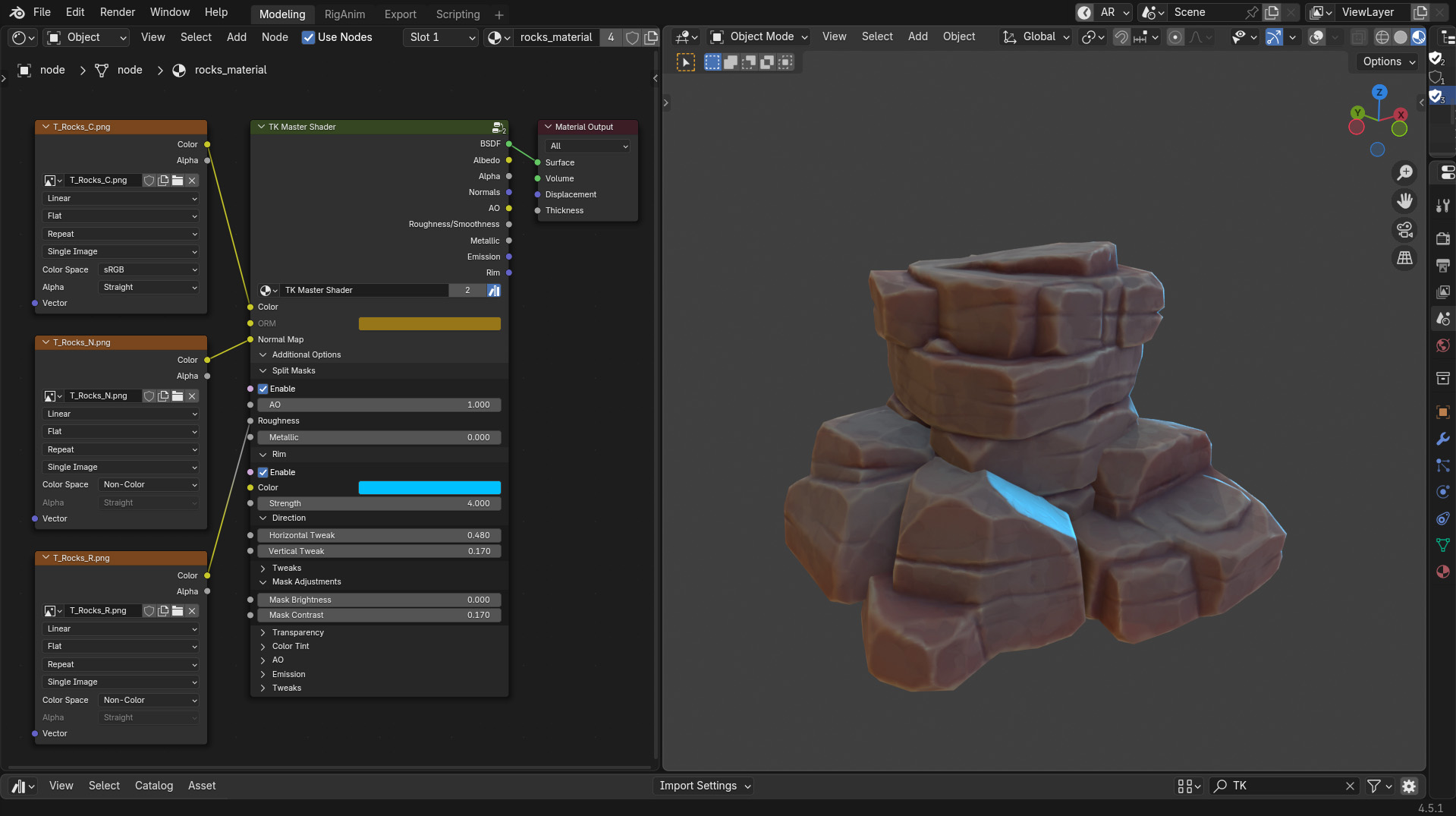
It may not look like much but it contains many useful options. By default it only needs an input of a color map, normal map and a Occlusion, Roughness, Metallic map packed in a single image. Here I will outline all the features the shader has and how to use them.
But I don’t always use ORM masks.
– That is why the first menu in the additional drop-down is about splitting masks. If enabled that allows you to input individual masks instead of the ORM map. Unused values can simply use a number (float) value.
– The “Rim” menu allows you to add a view-space rim light and adjust its position, color, intensity and even adjust the contrast, weather the light takes the normal map detail or how occluded it gets from the screen space ambient occlusion.
– Transparency allows you to use alpha mask for transparent materials
– Color tint allows you to tint you Albedo map with a color or a different texture.
– AO adds the ambient occlusion texture from the masks and even allows for a per-material tint of the occlusion.
– Emission works as expected.
And finally – the tweaks:
– Invert roughness turns the roughness map and turn it into a smoothness map. Useful if you are using materials from Unity.
– Normal Flip Y – flips the Y channel for an easy switch of the normal map direction.
– Normal Strength allows you to adjust the strength of the normal map. Keep in mind that this is not recommended for baked normal maps. I also added a few outputs. They are very useful for preview and debugging.
You can download the shader for free here.
Thank you for watching!